Author: Arun Bagul

MySQL starting problem on cPanel Server

MySQL starting problem on cPanel Server

Introduction – After fresh installation of cPanel server, Whenever I have tried to start MySQL server, it has failed to start due to unknown reason. This is really crazy problem on cPanel!. Even you upgrade MySQL from 4.0 to latest 5.x version, MySQL server simply failed to start!! You will not find any thing in log file ie ” /var/log/mysql.log“. I have tried so many thing to find out the reason of failure. If you try this cPanel /scripts/mysqlup –force command still it won’t help you.

What is the Solution?

The solution to this crazy problem is to remove or comment out the “basedir=/var/lib” line from my.cnf configuration file of MySQL server.

root@cpanel.arunbagul:~# cat /etc/my.cnf
[mysqld]
datadir=/var/lib/mysql
socket=/var/lib/mysql/mysql.sock

[mysql.server]
user=mysql
basedir=/var/lib

[mysqld_safe]
err-log=/var/log/mysqld.log
pid-file=/var/run/mysqld/mysqld.pid
root@server42 [/var/lib]#

root@cpanel.arunbagul:~#

** Finally the /etc/my.cnf file looks like –

root@cpanel.arunbagul:~# cat /etc/my.cnf
[mysqld]
datadir=/var/lib/mysql
socket=/var/lib/mysql/mysql.sock

[mysql.server]
user=mysql

[mysqld_safe]
err-log=/var/log/mysqld.log
pid-file=/var/run/mysqld/mysqld.pid

root@cpanel.arunbagul:~#

** Now you can start your MySQL server on cPanel server!!

Cheers,

Arun Bagul

Single user mode – How to reset(bypass) root password without bootable CD

Single user mode – How to reset(bypass) root password without bootable CD

Introduction – In many systems, User has to enter root password to enter in to “single user mode“. On Ubuntu/Debian system, you have to enter root password while entering into single user mode.

What to do if you loss or forgot root password ?

method(1) Use bootable CD – This is the last options to reset root password on your system. Infact if you have set GRUB password and you have loss root as well as GRUB password then only you need to go for this method. Otherwise go with second method…

method(2) Single user mode and bypass root password – You can reset root password even if your system require root password to enter in to single user mode. GRUB will help you to bypass , and will not ask you for root password.

This is as simple editing the preferred boot line in your GRUB boot loader menu at boot time…

  • Reboot the system, and when you are at the selection prompt(GRUB menu), highlight the line for Linux and press ‘e’.
  • This will take you to another screen, where you should select the entry that begins with “kernel” and press “e” again….
  • Append "single" to the end of that line (without the quotes and give space)
  • If your system requires you to enter your root password to log into single-user mode, then append init=/bin/bash after “single“. Hit “Enter” to save the changes.
  • Press “b” to boot into Single User mode.
  • Once the system finishes booting, you will be logged in as root. Use passwd and choose a new password for root.
  • Type reboot to reboot the system, and you can login with the new password you just selected.

Original Line –

/vmlinuz-2.6.22-14-generic root=/dev/sda5 ro quiet splash

Modify as –

/vmlinuz-2.6.22-14-generic root=/dev/sda5 ro quiet splash single init=/bin/bash


Thank you,

Arun Bagul

Script to check – Mail server IP addr is blacklisted or not?

Script to check – Mail server IP addr is blacklisted or not?

Introduction –

This shell script can be used to known whether the IP address of your mail server is black list or not…

Who can use this script ?

– System Admin, Mail Server admin or any one who want to find the IP address is black listed or not?

root@arunbagul:/home/arun/bash-prog# cat black_white_listing.sh
#!/bin/bash
echo “=========================================”
echo “Welcome to IndianGNU.org’s script to check the Blacklisting”

if [ $# -eq 0 ]; then
echo -n “Enter the IP Address of Mail Server: ”
#read the IP from cmd line
read IPAddr
else
IPAddr=$1
fi

#Reverse the IP…
ipaddr1=$(echo $IPAddr | awk -F. ‘{print $1}’)
ipaddr2=$(echo $IPAddr | awk -F. ‘{print $2}’)
ipaddr3=$(echo $IPAddr | awk -F. ‘{print $3}’)
ipaddr4=$(echo $IPAddr | awk -F. ‘{print $4}’)

##check the IP format here…

if [ “$ipaddr1” == “” ]; then
echo “Please enter the Valid IP address”
exit
elif [ “$ipaddr2” == “” ]; then
echo “Please enter the Valid IP address”
exit
elif [ “$ipaddr3” == “” ]; then
echo “Please enter the Valid IP address”
exit
elif [ “$ipaddr4” == “” ]; then
echo “Please enter the Valid IP address”
exit
fi

### create reverse IP
RevIP=”${ipaddr4}.${ipaddr3}.${ipaddr2}.${ipaddr1}”

echo “The IP (Reverse format):- ${RevIP}”

###################################
for check in {blocked.hilli.dk blacklist.sci.kun.nl,spamsources.dnsbl.info,map.spam-rbl.com \
mail-abuse.blacklist.jippg.org catchspam.com spam.blackhole.cantv.net blackholes.uceb.org dnsbl.solid.net}
do
#run cmd to check the IP black listed or not
dig ${RevIP}.$check >> /dev/null
if [ $? = 0 ]; then
echo “The ${IPAddr} IS White Listed”
else
echo “The ${IPAddr} IS Black Listed”
fi
done
#done
root@arunbagul:/home/arun/bash-prog#

How to use this script ?

root@arunbagul:/home/arun/bash-prog# ./black_white_listing.sh
=========================================
Welcome to IndianGNU.org’s script to check the Blacklisting
Enter the IP Address: 192.168.0.1
The IP (Reverse format):- 1.0.168.192
The 192.168.0.1 IS White Listed
root@arunbagul:/home/arun/bash-prog#

Thank you,

Arun Bagul

Introduction to cPanel (part-1)

Introduction to cPanel (part-1)

Introduction –

In this article we will cover cPanel directory structure and configuration files –
When you install cPanel on your web Server, cPanel configuration files, setting, script, admin templates and 3rd party modules are stored in following three directories –

/usr/local/cpanel
/var/cpanel
/scripts

1) /usr/local/cpanel – This is the main directory for cPanel, most of the setting is stored here.

cpanel1

a) /usr/local/cpanel/bin –This directory contains only scripts and binaries which provide installation and configuration of many cPanel managed services…

b) /usr/local/cpanel/logs –

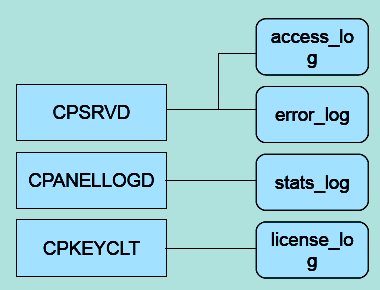
This directory contains access log ,error log and license log of cPanel control panel.

* Access log format –

[source address] – [username] [[date]] [status] [url] [browser agent]

root@arunbagul:~#tail -f /usr/local/cpanel/logs/access_log
127.0.0.1 – root [31/May/2006:23:11:31 -0500] “” 500 0
“https://www/cpane.net:2087/scripts/command?PFILE=main” “Mozilla/5.0 (X11; U; Linux
i686; en-US; rv:1.8.0.3) Gecko/20060512 Firefox/1.5.0.3”
127.0.0.1 – root [31/May/2006:23:11:31 -0500] “” 500 0
“https://www.cpanel.net:2087/scripts/command” “Mozilla/5.0 (X11; U; Linux i686; en-US;
rv:1.8.0.3) Gecko/20060512 Firefox/1.5.0.3”
…….
……….

root@arunbagul:~#

* Error log –

root@arunbagul:~# tail -f /usr/local/cpanel/logs/error_log
Can’t locate Net/AIM/Connection.pm in @INC (@INC contains: /scripts /usr/lib/perl5/5.8.7/i686-
linux… /usr/lib/perl5/site_perl/5.8.7/i686-linux /usr/lib/perl5/site_perl/5.8.7 /
usr/lib/perl5/site_perl/5.8.5 /usr/lib…. /usr/lib/perl5/site_perl/5.8.3 /usr/lib/perl5/site_perl/5.8.2 /
usr/lib/perl5/site_perl/5.8.1 /usr/lib/perl5/site… /usr/lib/perl5/site_perl .) at /
usr/lib/perl5/site_perl/5.8.7/Net/AIM.pm line 37.
BEGIN failed–compilation aborted at /usr/lib/perl5/site_perl/5.8.7/Net/AIM.pm line 37.
Compilation failed in require at /scripts/cPScript/iContact.pm line 14.
BEGIN failed–compilation aborted at /scripts/cPScript/iContact.pm line 14.
Compilation failed in require at /scripts/wwwacct line 18.
BEGIN failed–compilation aborted at /scripts/wwwacct line 18.
….
…..
root@arunbagul:~#

* License log file –

root@arunbagul:~# tail -f /usr/local/cpanel/logs/license_log
License Update Request at: Wed May 13
02:16:13 2007
License Server returned: Key Accepted
License Server returned: Key Follows
License Updated Successfully
….
…..
root@arunbagul:~#

* Stat log –

root@arunbagul:~# tail -f /usr/local/cpanel/logs/stats_log
Update for config
“/home/techdump/tmp/awstats/awstats.cpanel.net.conf”
With data in log file “/usr/local/apache/domlogs/techdump.net”…
Phase 1 : First bypass old records, searching new record…
Direct access to last remembered record is out of file.
So searching it from beginning of log file…
Phase 2 : Now process new records (Flush history on disk after
20000 hosts)…
Jumped lines in file: 0
Parsed lines in file: 14
Found 0 dropped records,
Found 0 corrupted records,
Found 0 old records,
Found 10 new qualified records.
…….
………

root@arunbagul:~#

cpanel2

c) /usr/local/cpanel/base –

This is the base directory for cPanel admin panel web server(apache). It also contains directory
/usr/local/cpanel/base/frontend – this directory content control pannel themes like x ,x2 , xmail, monsoon etc…

cpanelbase

d) /usr/local/cpanel/base/etc –

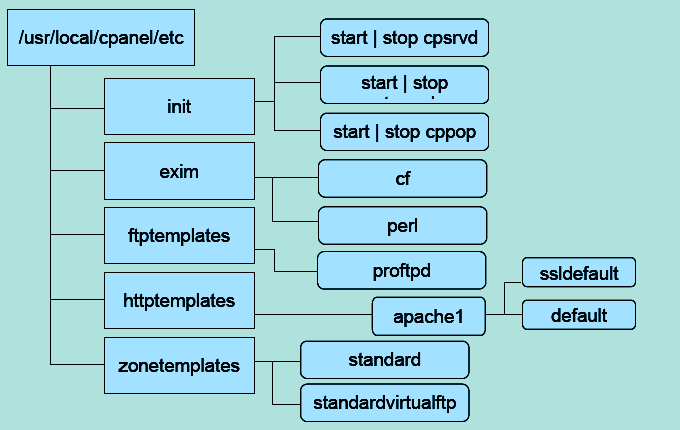
This directory contains conf files for cPanel admin panel, template files for FTP, HTTP, mail, zone files..

cpanelconf

e) Extra 3rd party modules for cPanel –

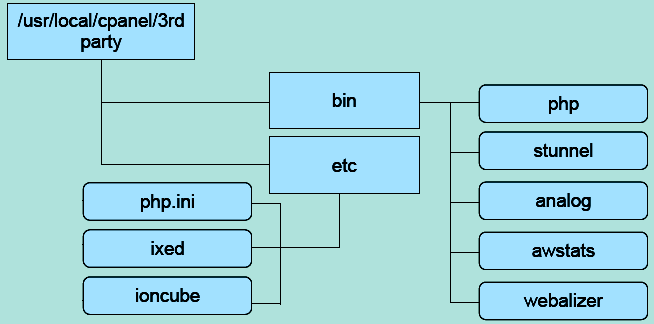
3rd party module which are not part of cPanel base, can be installed in /usr/local/cpanel/3rdparty directory.. like ioncube etc

cpanel3rdparty

Thank you,
Arun Bagul

File Descriptor error while mounting proc file system

File Descriptor error while mounting proc file system

Introduction-

One day I was just playing with device files in /dev directory. While next reboot I met a new error “Mounting proc filesystem Bad file descriptor No such partition found …” I have no idea why this is happening! I stuck with this problem for two days and with lot of search on internet I found that this is due to /dev/null is modifed as “regular file“!! To fix this, I login in to rescue mode and then remounted the root(/) file system as read-write and restore the /dev/null file!

bash-arun~# mount -n -o remount,rw /
bash-arun~#
bash-arun~# rm -f /dev/null

bash-arun~# mknod -m 0666 /dev/null c 1 3
bash-arun~#

That’s it!!

root@arunbagul:~# ls -l /dev/null
crw-rw-rw- 1 root root 1, 3 2008-02-29 09:22 /dev/null
root@arunbagul:~#

* As shown above the /dev/null is character device file…

command(1) mknod – this command is used to create “Block device” or “Character device” special files….

mknod [options]… NAME TYPE [MAJOR MINOR]

Options –

-m, –mode=MODE
set permission mode (permission need to be numeric format)
–help display this help and exit

–version
output version information and exit

Both MAJOR and MINOR must be specified when TYPE is b, c, or u, and they must be omitted when TYPE is p. If MAJOR or MINOR begins with 0x or 0X, it is interpreted as hexadecimal; otherwise, if it begins with 0, as octal; otherwise, as decimal.

TYPE may be –

b –> create a block (buffered) special file

c, u –> create a character (unbuffered) special file

p –> create a FIFO

Example –

root@arunbagul:~# mknod /tmp/arun p
root@arunbagul:~#
root@arunbagul:~# ls -l /tmp/arun
prw-r–r– 1 root root 0 2008-04-18 23:31 /tmp/arun
root@arunbagul:~#

root@arunbagul:~# mknod -m 666 /tmp/block_device b 12 16
root@arunbagul:~#
root@arunbagul:~# ls -l /tmp/block_device
brw-rw-rw- 1 root root 12, 16 2008-04-18 23:32 /tmp/block_device
root@arunbagul:~#

Cheers,
Arun Bagul

How to change MAC address of interface – ubuntu

How to change MAC address of interface – ubuntu

Introduction –

Why we need to change MAC address? On one of our proxy server which is directly connected to internet. Due to some reason I have to assign MAC address to one of the Interface eth0! My ISP want unique MAC address to interface which is connected to there service.

Set MAC address to interface manually –

step(1) Edit the /etc/network/interfaces file. to modify the interface configuration on Ubuntu or Debian system…

root@arunbagul:~# vi /etc/network/interfaces
root@arunbagul:~#

See your network interface conf file. If you have dhcp enabled, it will look like this…

root@arunbagul:~# cat /etc/network/interfaces

auto lo
iface lo inet loopback

auto eth0
iface eth0 inet dhcp

root@arunbagul:~#

step(2) Now specify the MAC address as shown below…

root@arunbagul:~# cat /etc/network/interfaces

auto lo
iface lo inet loopback

auto eth0
iface eth0 inet dhcp
hwaddress ether 01:06:03:04:0B:06

root@arunbagul:~#

step(3) Now restart your network service –

root@arunbagul:~# /etc/init.d/networking restart
* Reconfiguring network interfaces…
There is already a pid file /var/run/dhclient.eth0.pid with pid 4440
killed old client process, removed PID file

…..

DHCPACK from 192.168.1.10
bound to 192.168.1.89 — renewal in 3110 seconds.
[ OK ]
root@arunbagul:~#

step(4) macchanger – is the tool available for Ubuntu to change the MAC address –

How to install macchanger ?

root@arunbagul:~# apt-get install macchanger
Reading package lists… Done
Building dependency tree

…..
Setting up macchanger (1.5.0-1) …

root@arunbagul:~#

step(5) How to use this –

root@arunbagul:~# macchanger eth0
root@arunbagul:~#

Cheers,
Arun Bagul

Table types (storage Engine) in MySQL

Table types (storage Engine) in MySQL

Introduction –

Any database in MySQL is stored physically in Data directory of MySQL server. You can find data directory in /etc/my.cnf file or from running MySQL process..

arun@arunbagul:~$ ps aux | grep “/usr/sbin/mysqld” | grep -v grep
mysql 5534 0.0 1.0 127920 21136 ? Sl 21:09 0:00 /usr/sbin/mysqld –basedir=/usr –datadir=/var/lib/mysql –user=mysql –pid-file=/var/run/mysqld/mysqld.pid –skip-external-locking –port=3306 –socket=/var/run/mysqld/mysqld.sock
arun@arunbagul:~$

So data directory for MySQL server is normally “/var/lib/mysql“. Format of storing data physically in data directory is depends of the table type or Storage Engine used by MySQL. There are six (6) types of tables (Storage Engine) you can use in MySQL.

root@arunbagul:~# grep “datadir” /etc/mysql/my.cnf
datadir = /var/lib/mysql
root@arunbagul:~# cd /var/lib/mysql

root@arunbagul:/var/lib/mysql# ls -lF
total 8768
drwxr-xr-x 2 mysql mysql 4096 2008-04-01 07:51 mysql/
drwx—— 2 mysql mysql 4096 2008-04-09 12:39 trac/
drwx—— 2 mysql mysql 4096 2008-02-22 23:18 wordpress/
drwx—— 2 mysql mysql 4096 2008-03-07 11:27 zabbix/
root@arunbagul:/var/lib/mysql#

By default MySQL server creates administrative database called “mysql“. Which contains system tables necessary to control user access, provide help related to information, and support time-zone related functionality.

1) BDB – Tranction safe table that the berkeley DB handler manages. InnoDB tables have replaced BDB tables.

2) Memory – A table whose contents are stored in memory. The data stored in the tables is available only as long as the MySQL server is available. If the server crashes or is shutdown, the data disappears.

3) InnoDB – A transaction safe table that the InnoDB handler mamages. As a result, dtata is not stored in .MYD file, but instead is managed in the InnoDB tablespace.

4) ISAM – This table type was the default table type, now it is deprecated. Now a days MyISAM is the default table type used in MySQL.

5) MERGE – This is the virtual table that is made up of multiple MyISAM tables. Data is not stored in the MERGE table, but rather in the underlying MyISAM tables.

6) MyISAM – This is the default table type used in MySQL. Which support extensive indexing and are optimized for compressions and speed.

root@arunbagul:/var/lib/mysql# mysql -u root -p
Enter password:
Welcome to the MySQL monitor. Commands end with ; or \g.
Your MySQL connection id is 11
Server version: 5.0.45-Debian_1ubuntu3.3-log Debian etch distribution

Type ‘help;’ or ‘\h’ for help. Type ‘\c’ to clear the buffer.

mysql> show variables like ‘storage_engine’;
+——————-+—————–+
| Variable_name | Value |
+——————+—————–+
| storage_engine | MyISAM |
+—————–+——————-+
1 row in set (0.00 sec)

mysql> quit
Bye
root@arunbagul:/var/lib/mysql#

** How to define table/storage type in MySQL ?

mysql> create table person ( id INT(10) PRIMARY KEY, name VARCHAR(20) ) ENGINE=MyISAM;
Query OK, 0 rows affected (0.02 sec)

mysql> quit
Bye
root@arunbagul:~#

Thank you,
Arun Bagul

How to Transfer account on cPanel Server –

How to Transfer account on cPanel Server –

Introduction – Many times System Admin want to transfer cPanel user account (domain) from one cPanel server to other cPanel Server. cPanel allows to do account transfer via WHM as follows… (you should have  root access to both server).

step(1) Login to WHM
step(2) then Main menu >> Transfers >> Copy multiple accounts/packages from another server

Here you need to provide the old server IP, SSH port, and root password.

That’s it!. your account will be transfer to new server…

If the above method fails due to some or other reason, you can transfer accounts manually as follows….

step(1) Take backup of the accounts using the following script –

root@arunbagul:~# /scripts/pkgacct  <account username>

This will create a backup file under /home with name cpmove-<username>.tar.gz

for example –

root@arunbagul:~# /scripts/pkgacct indgnu

….
root@arunbagul:~#

root@arunbagul:~#  ls /home/cpmove-indgnu.tar.gz

step(2) Copy(use scp) this file into the new target server where you want to migrate your account –

root@arunbagul:~# scp /home/cpmove-<username>.tar.gz root@<new server ip>:/home/
….
……
root@arunbagul:~#

step(3) Restore accounts using the following script (on new target server) –

root@arunbagul:~# /scripts/restorepkg <account username>

NOTE:- Make  sure that the account on old server is disabled or removed/suspended!!

Cheers,
Arun  Bagul