Author: Arun Bagul

NetApp and Storage hardware terminology

NetApp and Storage hardware terminology

Introduction-

Storage systems that run Data ONTAP are sometimes referred to as filers, storage appliances, or systems.
Controller or Storage controller refers to the component of a storage system that runs the Data ONTAP.

* FC HBA for Disk or FC HBA refers to the Fibre Channel (HBA) Host Bus Adapter
that connects the node to the switch or to the disks
* Disk shelf is a unit of the disk subsystem component of the storage system. Disk shelves,
which hold disks and associated hardware.
* LRC (Loop Resiliency Circuit) disk shelf module that keeps the Fibre Channel-Arbitrated Loop (FC-AL) intact during the
addition and removal of disks within a disk shelf.
* ESH (Embedded Switching Hub) disk shelf module that provides a means of managing an FC-AL loop in an intelligent manner,
such that a single drive failure does not take down the loop.
* FilerView graphical user interface for NetApp

Regards,
Arun Bagul

Manage/Administer NetApp

Manage/Administer NetApp

Manage/Administer NetApp

Introduction-

– To manage/administer NetApp you can use CLI (telnet,ssh, serial port,SP,RLM or BMC), FilerView, the DataFabric Manager (DFM)
software, or the Manage ONTAP Developer SDK software.
– Mount /vol/vol0 (root volume) of netapp storage locally and change configuration
– If you are entering a command with an element that includes a space, you must quote that element. For example,
arun_netapp> environment status chassis “Power Supply”
– CLI History – Scroll back through commands press – Ctrl-P or Up arrow key.
Scroll Forward through commands press – Ctrl-N or Down arrow key.
-CLI help
arun_netapp> help
arun_netapp> ?
arun_netapp> environment help
Usage: environment status
-CLI man page
arun_netapp> man command_or_file_name

* Remotely access the system console  using SP(Service Processor), RLM or BMC –
Login to the SP, RLM or the BMC ( system responds with the SP,RLM or BMC prompt)
Enter the following command at the RLM or BMC prompt: system console
username – naroot
Return to RLM prompt, press Ctrl-D
Return to the BMC prompt, press Ctrl-G

# ssh  naroot@prod-netapp

* ONTAP commands at different privilege levels –

a)  Administrative level –  enables you to access commands that are suffi cient for managing your storage system.
b)  Advanced level –  provides commands for troubleshooting, in addition to all the commands available at the administrative level.

Thank you,
Arun Bagul

What is Virtualization and Types of Virtualization

What is Virtualization and Types of Virtualization

What is Virtualization and Type of Virtualization?

In general there are different types of virtualization like Memory,CPU, Storage, Hardware and Network virtualization. Howver here we are going to talk about OS virtualization only.

1] What is Hypervisor –

Hardware virtualization or platform virtualization refers to the creation of a virtual machine that acts like a real computer with an operating system. Software executed on these virtual machines is separated from the underlying hardware resources.
The words host and guest are used to distinguish the software that runs on the physical machine from the software that runs on the virtual machine.
The software or firmware that creates a virtual machine on the host hardware is called a hypervisor or Virtual Machine Manager.

2] Type of Virtualization –

a) Para-virtualization –
-Guest OS has to be modified
-VM does not simulate hardware
-Use special API that a modified guest OS must use
-Hypercalls trapped by the Hypervisor and serviced
-Xen, VMWare ESX Server

b) Full-virtualization (Native) –
VM simulates “enough” hardware to allow an unmodified guest OS to be run in
isolation. Same Hardware and CPU/Memory, eg- Vmware,IBM VM family,Parallels,
Xen.
* Full virtualization with Xen Hypervisor requires:
i) Intel processor with the Intel VT extensions, or
ii) AMD processor with the AMD-V extensions, or
iii) an Intel Itanium processor
* Full virtualization with KVM hypervisor requires:
i) Intel processor with the Intel VT and the Intel 64 extensions, or
ii) AMD processor with the AMD-V and the AMD64 extensions

c) Emulation –
-VM emulates/simulates complete hardware
-Unmodified guest OS for a different PC can be run
-VirtualPC for Mac, QEMU

d) OS-level virtualization –
-OS allows multiple secure virtual servers to be run
-Guest OS is the same as the host OS, but appears isolated apps see an
isolated OS. eg: Solaris Containers, BSD Jails, Linux Vserver,OpenVZ and LXC (LinuX Containers)

e) Application level virtualization –
-Application is gives its own copy of components that are not shared
(eg: own registry files, global objects) – VE prevents conflicts, JVM

Thank you,
Arun Bagul
Rigs of Rods

Rigs of Rods

Introduction-

First of all thanks to “sourceforge.net” for hosting open source software. I’m follower “sourceforge.net” of project of the Month.

“Rigs of Rods is project of month for November 2012. This is one of the best and rocking open source project.
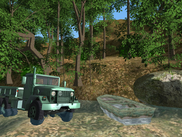
Rigs of Rods is a 3D simulator game where you can drive, fly and sail various vehicles using an accurate and unique soft-body physics engine.


* I love this Software!

Thank you,
Arun Bagul

Firefox yslow and Showslow for Website testing and automation

Firefox yslow and Showslow for Website testing and automation

Introduction-

Showslow is web based interface to collect yslow data. We can use yslow+showslow to get website loadtime and various other details provided by yslow.

This howto explains how to automate website loadtime/yslow testing using Firefox and Perl (Mechanize::Firefox, Firefox::Application module)

* Please download perl scripts and Strawberry perl for Windows-

URL-

http://www.indiangnu.org/wp-content/uploads/2012/firefox-cli-for-yslow-url-pl.txt

http://www.indiangnu.org/wp-content/uploads/2012/firefox-cli-for-yslow-url-from-csv-pl.txt

http://www.indiangnu.org/wp-content/uploads/2012/yslow-firefox-sh.txt

* Reguirement-

1) Firefox -MozRepl extension to connect to firefox using socket -firebug and yslow extension/addon

2) Perl -WWW::Mechanize::Firefox module -Firefox::Application module *

1] How to create Firefox profile-

root@arunb:/home/arunb/firefox-yslow# /var/firefox-4.0.1/firefox/firefox -CreateProfile yslow /home/arunb/firefox-yslow/yslow_firefox_profile Success: created profile ‘yslow’ at ‘/root/.mozilla/firefox/rjel2s26.yslow/prefs.js’ root@arunb:/home/arunb/firefox-yslow#

NOTE- On Window create profile with ‘firefox -p’ command

* 2] Showslow Setup-

Download showslow and put in Documentroot directory of apache/web server. Then Create DB,Add DB details in config file and type ‘make’ in source directory mysql> create database showslow; mysql> grant all privileges on showslow.* to ‘showslow’@localhost identified by ‘mypass’;

* 3] Now Configure Firefox to submit "yslow" results to "showslow"

Yslow 2.x extensions.yslow.beaconUrl = http://mywebserver/showslow/beacon/yslow/ extensions.yslow.beaconInfo = grade extensions.yslow.optinBeacon = true extensions.yslow.autorun = true

IMP- Please enable following setting in firefox. extensions.firebug.allPagesActivation", "on"

* 4] Perl and Firefox/Mechanize Module –

root@arunb:/home/arunb/firefox-yslow# ./firefox-cli-for-yslow-url.pl http://www.glam.com

For more info – http://www.showslow.org/Tools_configuration#ShowSlow_Installation_and_configuration http://getfirebug.com/wiki/index.php/Firebug_Preferences

Thank You,
Arun Bagul

perl script to check Bind dns zone files

perl script to check Bind dns zone files

Introduction –

dns-zone-verify.pl is perl script used to check dns zone file syntax! This script verifies both Forward and Reverse Zone.
Internally perl script is using named-checkzone and named-checkconf. Bind dns commands to check zone file syntax.
Script is reading named.conf file to get all zone

* Download – Please download perl script from following locations…

http://www.indiangnu.org/wp-content/uploads/2012/dns-zone-verify-pl.txt

* How to run/use –

root@localhost~# perl ./dns-zone-verify.pl

* Usage: ./dns-zone-verify.pl { –verify }

root@localhost~# perl ./dns-zone-verify.pl –verify

zone myzone_internal.file/IN: loaded serial 2007013101
OK

zone myzone_external.file/IN: loaded serial 2012100527
OK
….
root@localhost~#

Thank you,
Arun Bagul

Parse FTP server log and send mail for every uploaded files

Parse FTP server log and send mail for every uploaded files

Introduction –

One of my friend was looking for script to parse FTP server log after every 10mins and send mail for every file uploaded by user
with Username, Uploaded File Name, Date and Size.  Please prefer the follow perl script to this task….

Download ftp file from here – http://www.indiangnu.org/wp-content/uploads/2012/ftp_logparser-pl.txt

1] Script –

arunb@mylaptop:~$ cat perl-prog/ftp_logparser.pl

#!/usr/bin/perl

use strict;
use warnings;

no warnings 'uninitialized';

my $argument = $#ARGV + 1 ;
my $mylog_file = $ARGV[0];

if ( -f $mylog_file ) {
  print "\nChecking FTP log file for Upload files ~ $mylog_file";
  open(FILE, "<$mylog_file") or die("\nFile not found : $! ");

  print "\nContent of file is....\n";
  while() {
	chomp($_);
	## Fri Jul  6 14:15:25 2012 [pid 27841] [vivek] OK UPLOAD: Client "172.30.1.76"," /squid-2 7-Template-v23.docx", 594488 bytes
	#print "\nLine=> $_";
	if ($_ !~ /^\s*$/) {
	  #print "\nLine=> $_";
	  if ($_ =~ m/(.*)\s+\[pid.*\]\s+\[(.*)\]\s+OK\s+UPLOAD:\s+Client\s+"(\d+.\d+.\d+.\d+)","(.*)",\s+(\d+)\sbytes.*/) {
	     my ($mydate, $myser,$ipaddr, $file_upload, $file_size) = ($1,$2,$3,$4,$5);
	     print "\n'$mydate' - '$myser' - '$ipaddr' - '$file_upload' - '$file_size'";
	     ## send mail
	     my $CONTACTEMAIL = "abc\@xyz.com";
	     open(MAIL, "|/usr/sbin/sendmail -t");
	     print MAIL "To: $CONTACTEMAIL\n";
	     print MAIL "From: ftp\@abc.com\n";
	     print MAIL "Subject: File Uploaded- $file_upload";
	     #print MAIL "\nContent-type: text/html\n\n";
	     print MAIL "\nContent-type: text/plain\n\n";
	     print MAIL "\nFile Name: $file_upload";
	     print MAIL "\nFile Size: $file_size bytes";
	     print MAIL "\nUser: $myser";
	     print MAIL "\nIPaddr: $ipaddr";
	     print MAIL "\nDate: $mydate";
	     close(MAIL);
	  }
	}
  }
  close(FILE);

  print "\nDone";
} else {
   print "\n * Usage: $0  \n";
}

#end
print "\n";
arunb@mylaptop:~$

2] How to Use –

arunb@mylaptop:~$ ./perl-prog/ftp_logparser.pl

* Usage: ./perl-prog/ftp_logparser.pl

arunb@mylaptop:~$ ./perl-prog/ftp_logparser.pl /var/log/ftp.log

Thank you,
Arun Bagul

What are the mount options for databases on NetApp NFS

What are the mount options for databases on NetApp NFS

Introduction-
If you are using NFS (mount) volume/drive for Database, Then following mount options are recommended for databases on NetApp NFS:

Common mount options are = rw,bg,hard,rsize=32768,wsize=32768,vers=3

OS Mount Options for Binaires Mount Options for Oracle Datafiles
Solaris noac,nointr, proto=tcp, suid forcedirectio, noac,nointr, proto=tcp,suid
AIX nointr,timeo=600, proto=tcp cio,noac, nointr,timeo=600, proto=tcp
HPU noac,nointr, timeo=600, proto=tcp,suid forcedirectio, noac,nointr, timeo=600, proto=tcp, suid
Linux actimeo=0, nointr, suid, timeo=600, tcp actimeo=0, nointr, suid, timeo=600, tcp

Example –
root@myhost:~# cat /etc/fstab
arun_netapp07:/vol/db_vol /mydata nfs actimeo=0,nointr,suid,timeo=600,tcp,rw,bg,hard,rsize=32768,wsize=32768,vers=3 0 0

Thank you,
Arun Bagul

Karesansui – Xen and kernel-based Virtual Machine (KVM) Manager

Karesansui – Xen and kernel-based Virtual Machine (KVM) Manager

Introduction –

Karesansui is the best web based kernel-based Virtual Machine (KVM) and Xen Manager.
Also one of the leading Japanese open source project.

Karesansui has Simple, easy web-based interface. Easy installation. Saves initial cost to use. Free for all.
Supports Xen/Kernel-based Virtual Machine(KVM) hypervisor. Other hypervisors/virtualization support on future plan.


Please refer the project URL for more information-  http://karesansui-project.info/

* How to install –

Please go through the steps as mentioned here- http://karesansui-project.info/wiki/1/En_tutorial

Thank You,
Arun Bagul